
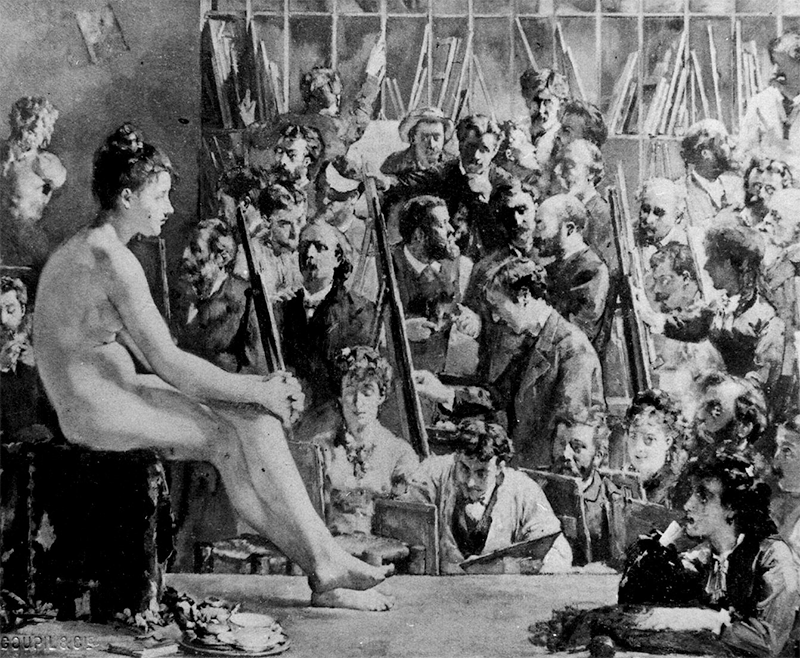
Une Académie de Peinture. Salon de 1876, by Rodolphe Julian (1839-1907) depicts the interior of Julian’s studio during a life class. George Moore aet. 24 stands in the middle ground right of center, in profile turned to his right, his right hand raised to a canvas. The tall man in the farthest background above Moore is Lewis Welden Hawkins (1849–1910), Moore’s flatmate and fellow student at Académie Julian. This is the earliest known portrait painting of Moore. A few years later he fictionalized Hawkins as Lewis Seymour in A Modern Lover and recalled their formative Parisian adventures in Confessions of a Young Man. This print is courtesy of the Louvre. Present whereabouts of Julian’s oil painting unknown. I intend to find it.
Hi Reader! Hauling George Moore across the digital divide takes a lot of housekeeping. By that I mean cleaning, repairing, correcting, polishing, replacing, filling in, fleshing out, and testing his data.
This may be true of other modernist masters, but maybe not as true. For years they’ve been serviced by an academic-industrial complex of investigators, librarians, curators, collectors, editors and publishers. Their data have been thoroughly scrubbed, but Moore’s have not.
Lately I’ve been scrubbing the Iconography of George Moore, which I myself originated as a lecture at the Metropolitan Museum of Art and a paper in the Irish Arts Review. It was a simple and straightforward thing to give a lecture to listeners and write a paper for readers; it’s another thing entirely to build a dynamic database for users. That’s what I’m doing now.
To build it well I first had to decide how people of various stripes may use the Iconography, then design so that every foreseeable use case is supported. Supporting usage is nothing like the pedagogic hustle of informing and teaching. Design in this instance is less about imparting knowledge to people than enabling and rewarding their behavior. It depends on identifying the structural affordances in a data set, making them apparent, and facilitating their operation.
For this fairly large database of pictures my scrub involves folding hard and soft facts into resources that increase their purport. That’s different from scholarly exegesis; it’s more about enlarging a picture’s intrinsic meaning to include causes and effects. It mandates going beyond classic footnotes that reveal sources of evidence to embedding links that trigger and elucidate the relationships inherent in, and with, the data — some of which are obvious, many of which are not.
Each picture in my digital Iconography of George Moore — including images of other people, of places and of things — is a manifold visual datum: a thing to view the way artwork on the wall or floor of a gallery is viewed. You can look at each picture and reflect. If that’s all you care to do, you’re then ready to move on.
That said, since these pictures are in cyberspace rather than on a wall or floor, you have more ways to engage. Because they are interactive, you can interrogate, manipulate, interpret, order and align them. Each picture can merely be viewed but also used as a tool for exploration.
By scrubbing visual, textual and quantitative metadata, I have absorbed lots of physical properties and social history into my iconographic records, and given the whole project a pulse. Even if it’s not definitive, each record will facilitate every use case that I have foreseen.
So far then, scrubbing the data involves encoding, for each of the hundreds of pictures, the following metadata:
- Unique Identifier ….. a GMI catalog number
- Category ….. genre, kind or class of the picture
- Name of Creator ….. who made the thing
- Link to Creator ….. Wikipedia entry or surrogate
- Name of Picture ….. in my iconography (not the given name)
- Link to Picture ….. external URL
- Thumbnail ….. low resolution PNG
- Date of Picture ….. when the picture was made
- Aetatis ….. age of George Moore in a picture
- Locus ….. where he was situated at that time
- Medium ….. materials used to make the picture
- Dimensions ….. imperial and metric
- Description ….. the picture’s alt text
- Literary References ….. expert commentary
- Related Pictures ….. similar or comparable
- Published ….. by whom, in what and when, with page number
- Owner ….. a person or institution
- Collection ….. the owner’s metadata
- Location ….. where the owner keeps the picture
- Contact Information ….. of the owner
- Notes ….. ad hoc
You may have noticed that high-resolution TIFs of pictures are not on my list, though they are needed for some use cases. There are legal and financial reasons for excluding them from the Iconography. That said, with metadata that I do provide, you’ll be able to request a high-res image directly from an owner.

5 responses to “Scrubbing the Data”
Hi Bob,
I got this while I was away – and waited until I got home (to better internet!) to have a look. What does ‘Scrubbing the Data’ mean? Is the picture attached?
Mary
LikeLike
Thanks for commenting Mary. “Data cleansing, also referred to as data cleaning or data scrubbing, is the process of fixing incorrect, incomplete, duplicate or otherwise erroneous data in a data set. It involves identifying data errors and then changing, updating or removing data to correct them.”
LikeLike
So what had to be scrubbed?
LikeLike
The overarching goal of data scrubbing is to make the canon free of errors, machine readable, supportive of computer analysis and simulation. It involves making sure that every fact is fact checked and linked to related facts, every gap in meaning is filled or bridged, and continuity is as close to perfect as I can make it. An example that came up when I examined Christine’s book is the reproduction of “Gaffer George,” an illustration that was new to me. Who was “Nancy”? “Page 2” of what? What is Max talking about in his cover letter? Hopefully the answers are in the book (I only just received it from interlibrary loan) but they’re not on the pages with the artwork, so I need to scrub before my account of the picture is complete. Scrubbing is to make sure that a machine can “probably” answer these and similar questions for a user who wants to know.
LikeLike
Mary, your second question “is the picture attached?” Yes, thumbnails of each picture are in the database. A thumbnail in this project is a low-resolution PNG, suitable for viewing on a device but not for print publication or zooming in very close to examine pixels.
LikeLike